What is your developer-dependent CMS actually costing you? Calculate your costs and get a full report


Authentication
Authenticate with Microsoft or Azure AD/Entra
Sign in to Agility with a Microsoft account or your organization's Microsoft Entra ID (Azure AD) account, and when to use Enterprise SSO instead.
You can sign in to Agility with a personal Microsoft account or with your organization's Microsoft Entra ID (formerly Azure AD) account.
Microsoft confirms who you are, and Agility matches your email address to a user that an administrator has already added to Agility. Nothing else is read from your Microsoft account. Groups, roles and other directory information aren't used, and your permissions come from your Agility role. If your Entra administrator requires MFA or other policies, they apply when you sign in.
How to sign in
There are two ways:
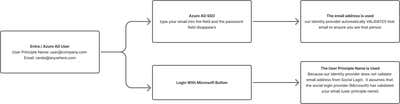
- From the email field. Enter your email address on the sign-in page. If your organization uses Entra SSO, the password field disappears. Select Login, and you're sent to the Microsoft sign-in page to sign in as usual.
- With the Sign in with Microsoft button. You're sent straight to the Microsoft sign-in page. Enter your UPN (User Principal Name) email address.
With the Sign in with Microsoft button, Agility accepts only the UPN email address. Microsoft Entra lets administrators give a user an email address that differs from their UPN, which an attacker could use to impersonate another address, so Agility doesn't trust it. Since October 2025, your Agility email address must be your UPN. If you can't see your instance after signing in, ask your instance administrator to check that your UPN has access.
Here is the sign-in process:
Sign in with Microsoft or Enterprise SSO?
Sign in with Microsoft is available to everyone. It's a convenient way to sign in, but on its own it doesn't stop your users from also signing in with a password or another provider.
Enterprise SSO connects Agility to your organization's identity provider for your email domains. With the other sign-in methods turned off, every user must sign in through Entra, so your Conditional Access and MFA policies apply to every sign-in. Choose Enterprise SSO if your organization needs to control how and from where people sign in.
Direct link to Entra sign-in
To send users straight to the Microsoft Entra sign-in page, for example from your intranet's app portal, use:
https://manager.agilitycms.com/login?connection=azure-ad
On this page