

Administrators
Administration Overview
This guide provides an overview of Agility CMS administration, including the interface, capabilities, and key administrative concepts.
This guide provides an overview of Agility CMS administration, including the interface, capabilities, and key administrative concepts.
Understanding Agility CMS Architecture
As an administrator, it's important to understand how Agility CMS is structured. Agility CMS follows a headless architecture pattern:
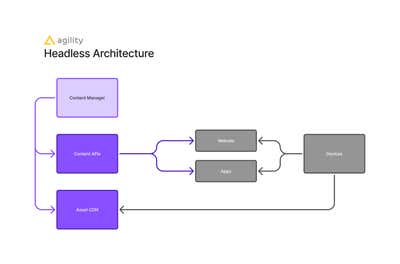
Agility CMS uses a headless architecture where content is managed separately from presentation. Content is created in the Content Manager, exposed through Content APIs, and consumed by frontend applications. Assets are delivered via CDN. This architecture enables multi-channel publishing and independent scaling.
Understanding the Data Model
Agility CMS organizes content using a structured data model:
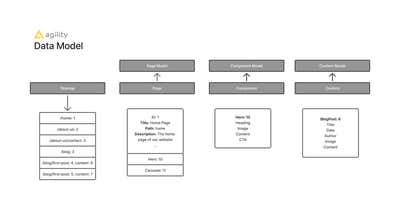
The Agility data model shows how Sitemap organizes Pages, Pages contain Components, and Components display Content Items. Each entity has a corresponding Model that defines its structure. As an administrator, you'll manage these Models (Page Models, Component Models, Content Models) and configure how they relate to each other.
Admin Interface Sections
The Agility CMS administration interface is organized into four main sections:
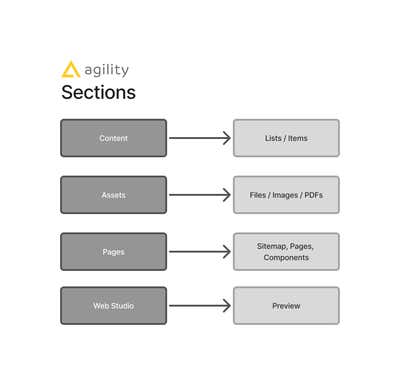
The Agility CMS interface is organized into: Content (Lists/Items), Assets (Files/Images/PDFs), Pages (Sitemap/Pages/Components), and Web Studio (Preview). As an administrator, you'll work across all these sections to configure and manage the instance.
Detailed Interface Areas:
- Content - Manage content models and content items
- Pages - Manage pages, sitemap, and page models
- Components - Manage component definitions
- Assets - Manage media library
- Settings - Instance configuration
- Users - User and role management
- Security - Access control and API keys
Admin Capabilities
As an administrator, you can:
- Create and modify content models
- Define component structures
- Manage user accounts and permissions
- Configure instance settings
- Access API keys and security settings
- Manage sitemaps and page models
- Configure workflows via Security settings
- Set up webhooks
- Access reports and analytics
Key Administrative Concepts
Models vs Instances
- Models: Define structure (content models, component models, page models)
- Instances: Actual data (content items, components, pages)
Permissions vs Roles
- Permissions: Base-level actions (Read, Edit, Publish, etc.)
- Roles: Collections of permissions (Editor, Publisher, Admin, etc.)
Workflows
Workflows are configured through:
- Global Roles: Assign roles to users
- Security Settings: Configure permissions on lists and pages
- Item-Level Permissions: Granular access control
Administrative Workflow
Initial Setup
- Configure locales
- Set up sitemap
- Create content models
- Create component models
- Configure page models
- Set up users and permissions
Ongoing Management
- Monitor content and usage
- Manage users and permissions
- Update models as needed
- Configure workflows
- Monitor security and API usage
Best Practices
- Start with Minimum Permissions: Begin with minimum required permissions
- Document Configurations: Document all configurations and decisions
- Regular Reviews: Review user access and configurations regularly
- Security First: Prioritize security in all decisions
- Monitor Usage: Track instance usage and performance
Next: User Management - Users and permissions