What is your developer-dependent CMS actually costing you? Calculate your costs and get a full report


Introduction
Scheduling Overview
Schedule time-sensitive content releases with ease.
What is Scheduling and why is it important?
Agility offers powerful publication scheduling that allows you to plan your content in advance and decide a specific Release Date (when your content should automatically be published) or an Expiry Date (when your content should automatically be unpublished)
What can be Scheduled?
Within Agility you can schedule:
- Content Items
- Pages
- Components
Scheduling a Release or Expiry Date
What is a Release Date?
The Release Date is the time and date you want the content to automatically Publish itself to your live site. This can be done for either a brand-new page or piece of content that has not been previously published to your site or to schedule an update to an existing page or piece of content.
In the event you’re scheduling an update to an existing page or piece of content and do not want the old version to remain live in the meantime, be sure to unpublish it first.
How to Set a Release Date
1. While in Edit mode for the Layout, Component or Piece of Content you’re managing, click the Menu Icon on the right-hand side.
2. Select Schedule.

3. Click Create a New Schedule in the scheduling options that open.

4. Set the Date and Time you’d like to schedule it to release and/or expire.

5. Click Schedule
Additionally, when clicking Publish for a Page or Piece of content you’ll receive a pop-up asking you to confirm you’d like to Publish and an option to schedule instead. By checking Schedule this item to be published you’ll be given the same options you’d see in the Scheduling Menu mentioned above.
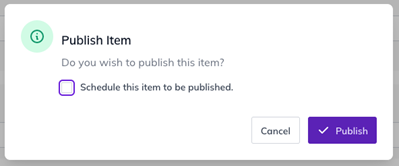
The Publish prompt is also where you choose what is published along with the item. Since September 23, 2026, publishing a page or content item also publishes its nested linked content by default, and you can tick Publish this item only to leave it out. The option only appears when there is nested content to include. Before you schedule a release, check the nested content as well as the item itself. See Previewing, Publishing, and Content States.
Stacking a Change
You may find yourself in a situation where you want to make a temporary change to a page and have it automatically revert back or change to something else later. You can do this with scheduling as well.
First, publish the current change you want to be temporary, then change it back or make a new change and schedule that for the desired date. Easy!
What is an Expiry Date?
The Expiry Date is the time and date you want the content to automatically Unpublish itself from your live site. This too can be done for either a brand-new piece of content you only want live for a certain amount of time, or an existing piece of content you’d like pulled down at a specific time or date.
How to set an Expiry Date
- Follow the same steps as above but include a date and time for the Expiry Date as well.
Redirect URL
If you’re scheduling a Page and would like to re-direct to a different one in the meantime, a Redirect URL can be set during Step 4 while setting the time and date.
Agility CMS offers powerful publication scheduling that allows you to plan your content in advance and schedule when content should automatically publish or un-publish itself at any date or time in the future.
What Can You Schedule?
Agility provides the ability for Scheduling on the following:
- Content Items
- Pages
- Page Module
Release Date vs Pull Date
With any Content Item, Page or Page Module, you can set a scheduled date with a Release Date or a Pull Date. Note that you must click "Publish" after setting the scheduling information to tell Agility to start the schedule for that version of the item.
Release Date
When the item should be Released or Published to the Live site.
If the item is not yet live on the website (eg: it has never been published, or it was unpublished) than this item will not be shown on the website until the Release Date passes.
If there is already a published version of this item that is currently live on the site, and you schedule this item to be released in the future, the previous item version will STAY live on the site until the release date passes and the new version is displayed.
If you do NOT want the currently published version of an item to stay on the website while you are waiting for the release date to pass, simply un-publish the item to take it down from the site, and then schedule the new version of it with the release date you require in the future.
Pull Date
When the item should be Pulled or Un-Published from the Live site.
Note that because of caching, there may be up to a 10-minute delay before an item is pulled or released to the site. If you need up to the minute precision, you should contact your implementation partner to ensure the cache can be cleared for your content to be released at that moment.
Redirect URL
If configuring Scheduling on a Page, you can set the Redirect URL if you wish to redirect to another page before the Release Date has elapsed or after the Pull Date has passed.
On this page